Neon Clock Wallpaper

3.80

Information

Category:

Personalisation

Price:

Free

Rank:

23

Rating:

3.80

Overview

Neon Clock Wallpaper is a dynamic personalization app that allows users to design and display unique, customizable clocks on their mobile screens. This app caters to those who wish to express their individuality through their device's appearance.

The core functionality includes selecting from diverse clock templates or creating personalized designs by adjusting colors, sizes, and styles. With stunning neon effects, users can craft eye-catching wallpapers for both home screens and lock screens. The app empowers users to transform their devices into personalized works of art with just a few simple steps.

Features

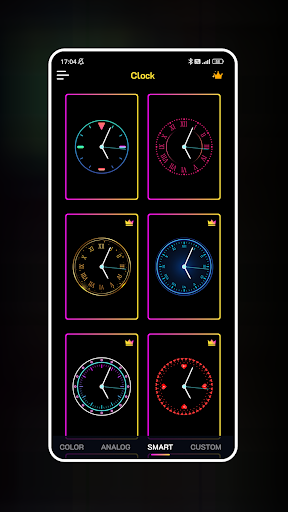
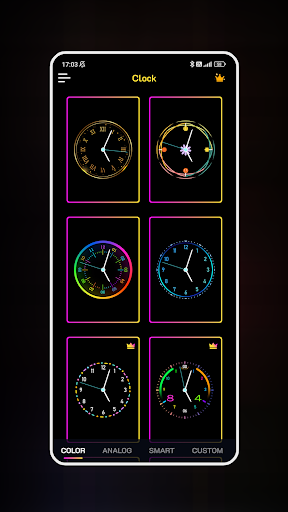
Neon Clock Wallpaper stands out with its rich feature set tailored for creative expression. The app offers an extensive selection of pre-made clock templates in various designs and colors, ensuring there's something for every taste.

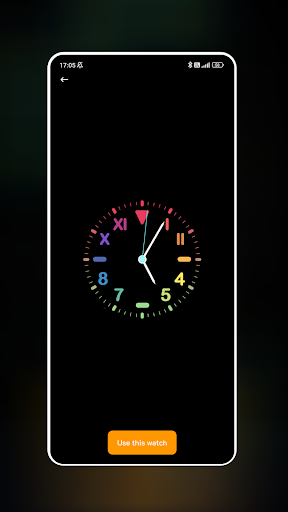
For those seeking more customization, the app provides tools to create bespoke clocks. Users can combine different components and apply vibrant neon effects to make their clocks truly unique. The ability to set these creations as both wallpaper and lock screen further enhances the personalization experience.

These features collectively enable users to showcase their personal style while enjoying the practicality of a functional clock display on their devices.

Customization options variety

The Customization options variety in Neon Clock Wallpaper offers users an extensive range of creative possibilities to personalize their device screens like never before. This feature is crucial as it allows individuals to express their unique style and preferences through customizable clock designs. With a diverse selection of pre-made clock templates available within the app each user can choose a design that resonates with their aesthetic be it minimalist modern or vibrant and eclectic. Beyond the templates the true power of customization lies in the ability to create entirely new clocks from scratch. Users can mix and match various components such as clock hands numbers and backgrounds customizing colors sizes and styles to suit their tastes. The inclusion of stunning neon effects adds another layer of personalization enabling users to make their clocks not only visually striking but also reflective of their personality. The value of this feature extends beyond mere aesthetics. By offering such a wide array of customization options Neon Clock Wallpaper enhances the user experience by making it interactive and engaging. Users are not just passive consumers of pre-designed wallpapers; they become active creators of their digital environment. This level of personalization ensures that no two clocks will ever be the same fostering a sense of individuality and ownership over one's device. Moreover the ability to set these custom-designed clocks as both wallpaper and lock screen further amplifies the personal touch users can add to their devices. Every time they unlock their phone or glance at the home screen they are greeted by a unique creation that is a reflection of their creativity and style. In essence the Customization options variety in Neon Clock Wallpaper transforms a functional aspect of a smartphone - telling time - into an opportunity for artistic expression and personal branding.

Theme compatibility

Theme compatibility in Neon Clock Wallpaper ensures that the personalized clocks created by users seamlessly integrate with their device's existing visual themes providing a cohesive and harmonious look across all screens. This feature is essential because it guarantees that regardless of the theme currently applied to a user's device whether it's dark mode a specific color scheme or a particular design language the custom clocks will not appear out of place or disrupt the overall aesthetic. The app achieves this by employing advanced algorithms that analyze the current theme settings and automatically adjust the clock elements to complement them. For instance if a user has selected a dark theme the app might suggest darker colors for the clock face or adjust the brightness of neon effects to ensure readability without compromising on style. Similarly when a light theme is in use brighter more vivid colors could be recommended to maintain contrast and visibility. This intelligent adaptation not only preserves the integrity of the deviceu2019s visual identity but also enhances the user experience by eliminating any potential clashes between the custom clock and other interface elements. Furthermore Theme compatibility extends beyond just color adjustments. It encompasses considerations such as font styles icon shapes and even animation effects ensuring that every aspect of the custom clock aligns perfectly with the chosen theme. This attention to detail results in a unified appearance where the clock does not merely serve as a standalone decorative item but becomes an integral part of the deviceu2019s visual ecosystem. Users benefit significantly from this feature as it saves them the effort of manually tweaking settings to achieve a consistent look. Instead they can rely on Neon Clock Wallpaper to handle these adjustments automatically allowing them to focus solely on the creative process of designing their ideal clock. Ultimately Theme compatibility underscores the appu2019s commitment to delivering a truly personalized yet effortlessly integrated experience where form meets function in perfect harmony.

Props

User-friendly interface

Vibrant neon effects

Customizable clock designs

Wide template selection

Quick setup process

Cons

Limited free options

High battery consumption

Occasional glitches

Ads between features

Complex for beginners

Features and Functions

What is this app and what can I use it for?

A tool to create custom neon clock wallpapers

How do I download and install this app on my device?

Search Neon Clock Wallpaper on Google Play and tap install

How do I get started after opening the app for the first time?

Select a template and customize your first clock design

What are the main features and capabilities of this app?

Customizable clocks with neon effects for wallpapers

How can I customize my experience and adjust preferences?

Adjust clock size color and style in settings menu

How do I save or bookmark my favorite content for later access?

Save favorite designs directly to your gallery

How can I share content with friends or on social media?

Share clock designs via social media links

How do I access detailed information and explore more content?

Explore detailed settings for advanced customization

What permissions does this app need and how do I manage them?

Needs storage access manage in app settings

How do I check for updates and keep the app running smoothly?

Enable auto-updates in Google Play Store settings
Show more

User Reveiws

{{ comment.reviewer_name }}
{{ comment.review_date_formatted}}
{{ comment.review_content }}
{{ tab.name }}
{{ comment.reviewer_name }}
{{ comment.review_date_formatted}}
{{ comment.review_content }}
No reviews with this rating