
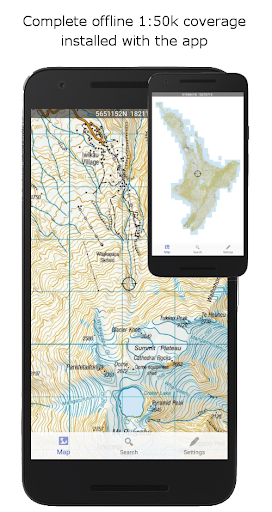
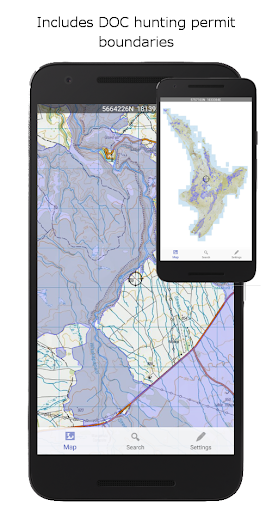
NZ Topo50 Offline - North is a comprehensive offline mapping application that provides complete 1:50k topographic map coverage of New Zealand's North Island using the LINZ NZTopo50 series maps. The app comes with all maps fully included upon installation, ensuring users have seamless access without the need for additional downloads or incurring extra fees.
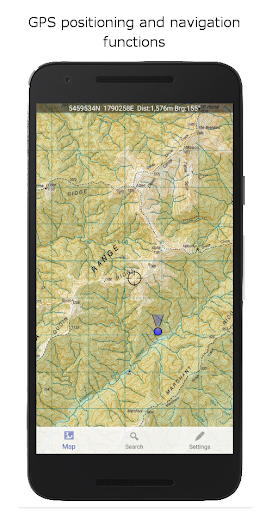
Designed specifically for outdoor enthusiasts and professionals alike, this app supports activities such as tramping, walking, biking, and search and rescue operations. It offers advanced navigation features including GPS positioning, track logging, user waypoints, and orientation tools, making it an essential tool for backcountry navigation where cellular access may be limited or nonexistent.
The app boasts a wide array of features tailored to enhance the user's navigation experience. Key functionalities include GPS positioning, allowing users to accurately determine their location on the map. Track logging enables users to record their routes, while user waypoints facilitate marking important locations.
Additional features encompass orientation (compass), altitude and speed display, distance and bearing calculations to points on the map, and route creation and following capabilities. Users can also search for and zoom into named places and features on the map. Furthermore, tracks and waypoints can be imported, exported, and shared in kml or gpx formats, promoting interoperability with other mapping systems.
A distinctive feature of NZ Topo50 Offline - North is its use of the NZ national map grid, which ensures precise map projections compared to the commonly used WGS84 datum. This results in perfectly parallel gridlines when the LINZ map is projected, offering unparalleled accuracy for navigation purposes.
Comprehensive offline map coverage
Advanced GPS navigation tools
No additional downloads or fees
Seamless user experience
Interoperable data formats
Large storage space requirement
Limited to North Island
No real-time traffic updates
Potentially complex for beginners
Specific to New Zealand region

Offline maps for phone and smart watch: topographic maps, satellite images...
 3.30
3.30
All of NHSA's trail information at your fingertips for the 2025-2026 season
4.2
Ride CTA, Metra & Pace: Manage your fares, buy Metra tickets, get arrivals.
3.00
LIRR and Metro-North tickets and trips
4.80
Get route map navigation with 3D satellite view, and live earth camera streaming
3.70
Drive safe with real-time speed camera radar, police, and traffic alerts
3.80
Explore Live Earth Map with 3D World Map & locate cites, mountains real time.
3.80
Explore Earth with live GPS, satellite view & street navigation
3.60
Lets explore the world's famous places by using Live Cams, GPS & Satellite View.
4.20
Truck Safe GPS Navigation & Maps: Parking, Fuel, Diesel, Weight Station
4.80
Park in Chicago, NYC, Boston, SF, Houston & more!
4.70
GPX Viewer PRO shows tracks, routes and waypoints from gpx and kml files.
4.60
Find trails, organize your locations and navigate with offline maps.
4.60
Navigate with your watch and keep the phone in your pocket!
4.60
Rideshare, taxi cabs, and more for your airport travels and everyday trips.
4.50
Instant diesel discounts - save big with each fill up!
4.40
Maps, Driving Directions & GPS navigation using directions app & GPS App
4.30
ParkWhiz, an Arrive Mobility brand, part of the Arrive Network
4.30
GPS navigation offers route finder, compass, translator, currency converter, etc
4.30


User Reveiws