RoughAnimator

4.40

Information

Category:

Art & Design

Price:

$ 7.99

Rank:

3

Rating:

4.40

Overview

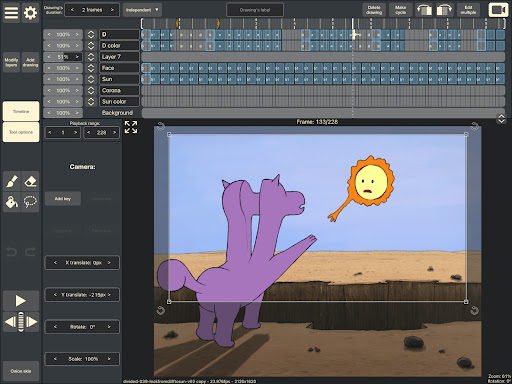
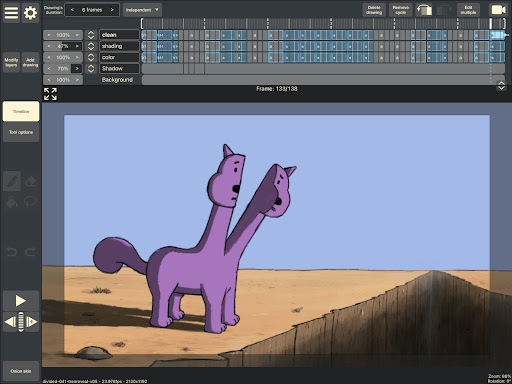
RoughAnimator is a professional-grade hand-drawn animation application designed specifically for Android users. This powerful tool caters to both seasoned animators and beginners, offering an extensive set of features needed for traditional frame-by-frame animation. With RoughAnimator, you can create high-quality animations anywhere, thanks to its intuitive interface and robust capabilities.

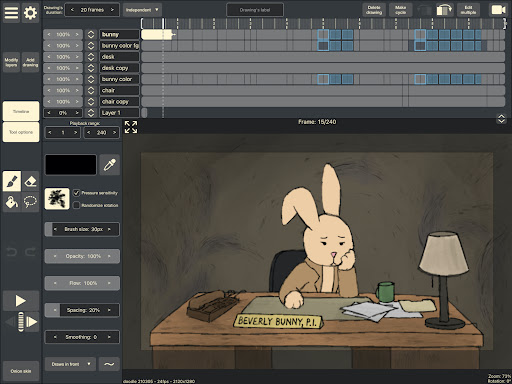
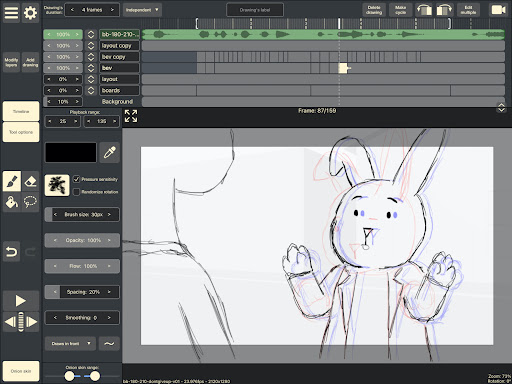
The app includes advanced functionalities such as onion skinning, timeline control with unlimited layers, and adjustable exposure lengths. It also supports importing audio for lip-syncing and video for rotoscoping, making it versatile for various animation styles. Whether you're sketching initial ideas or finalizing detailed animations, RoughAnimator provides all the necessary tools in one comprehensive package.

Features

RoughAnimator stands out with its rich feature set tailored for animators. The app offers a sophisticated timeline system that allows users to work with unlimited layers and easily adjust the exposure length of individual drawings. This flexibility supports both pose-to-pose and straight-ahead animation techniques, catering to different creative processes.

In addition to essential tools like onion skinning and preview playback, RoughAnimator supports custom brushes and pressure-sensitive devices such as the Samsung S-Pen. Animators can control frame rates and resolutions, ensuring their work meets professional standards. The ability to export animations to Quicktime video, GIF, or image sequences adds further versatility, while compatibility with Adobe Flash/Animate, After Effects, and Toon Boom Harmony makes it easy to integrate projects into broader workflows.

Creative tool completeness

Creative tool completeness refers to the range and depth of features provided by an application that enable users to fully realize their artistic vision. In the case of RoughAnimator, this powerful hand-drawn animation app offers a comprehensive suite of tools designed to cater to both professional animators and beginners alike. The app includes a timeline with unlimited layers, allowing for complex animations with easily adjustable exposure lengths for individual drawings, which is essential for both pose-to-pose and straight-ahead animation techniques. Onion skinning provides users with the ability to see multiple frames at once, aiding in the smooth transition between poses. Preview playback and scrubbing along the timeline are crucial for reviewing work in progress. Additionally, the app supports importing audio for lip-syncing and video for rotoscoping, further expanding its creative possibilities. Custom brushes and compatibility with pressure-sensitive devices like the Samsung S-Pen enhance the drawing experience. Control over framerate and resolution ensures that animators can fine-tune their projects to meet specific requirements. Export options to Quicktime video, GIF, or image sequences provide flexibility in sharing and further editing in industry-standard software such as Adobe Flash/Animate, After Effects, and Toon Boom Harmony. This extensive set of features empowers users to create traditional hand-drawn frame-by-frame animations with professional-grade quality, making RoughAnimator a complete creative package for animators on the go.

Canvas/format flexibility

Canvas and format flexibility in an art application pertains to the adaptability and customization options available to users when working on their projects. For RoughAnimator, this aspect is evident in its versatile design tailored for animators who require precision and control over their work environment. The app allows users to adjust the canvas settings to suit various project needs, whether they are creating simple animations or complex, multi-layered artworks. With support for custom brushes, animators can replicate traditional drawing techniques or experiment with new styles directly on their device. The ability to import audio and video expands the creative canvas beyond static images, enabling features like lip syncing and rotoscoping that add dynamic elements to animations. Furthermore, RoughAnimator's compatibility with different pressure-sensitive devices ensures that artists can utilize their preferred hardware for a more natural drawing experience. The app also provides control over critical parameters such as framerate and resolution, allowing users to optimize their animations for different platforms and mediums. Exporting options to Quicktime video, GIF, or image sequences offer additional flexibility in how finished projects can be utilized or shared. Moreover, the capability to import RoughAnimator projects into desktop software like Adobe Flash/Animate, After Effects, and Toon Boom Harmony extends the creative workflow beyond mobile devices. This level of canvas and format flexibility ensures that animators using RoughAnimator have the freedom to explore their creativity without being constrained by technical limitations, ultimately enhancing productivity and artistic expression.

Props

Powerful animation tools

User-friendly interface

Supports multiple formats

Professional-grade features

Cross-platform availability

Cons

Steep learning curve

Requires specific hardware

Limited free features

Occasional bugs

High system requirements

Features and Functions

What is this app and what can I use it for?

RoughAnimator is a hand-drawn animation app for creating frame-by-frame animations on Android.

How do I download and install this app on my device?

Download RoughAnimator from Google Play Store and install it by following the on-screen instructions.

How do I get started after opening the app for the first time?

Start by exploring the tutorial section and familiarizing yourself with the interface and tools.

What are the main features and capabilities of this app?

Key features include onion skinning, timeline control, and support for custom brushes.

How can I customize my experience and adjust preferences?

Customize preferences in the settings menu to tailor the app to your workflow needs.

How do I save or bookmark my favorite content for later access?

Save favorite content by exporting animations to various formats like GIF or video.

How can I share content with friends or on social media?

Share animations directly via social media platforms or messaging apps within the app.

How do I access detailed information and explore more content?

Access detailed information through the help section and explore more features there.

What permissions does this app need and how do I manage them?

The app requires permissions for storage and camera access; manage these in your device settings.

How do I check for updates and keep the app running smoothly?

Check for updates in the app's settings and keep your device updated for optimal performance.
Show more

User Reveiws

{{ comment.reviewer_name }}
{{ comment.review_date_formatted}}
{{ comment.review_content }}
{{ tab.name }}
{{ comment.reviewer_name }}
{{ comment.review_date_formatted}}
{{ comment.review_content }}
No reviews with this rating