SmoothTrack

4.50

Information

Category:

Tools

Price:

$ 7.99

Rank:

50

Rating:

4.50

Overview

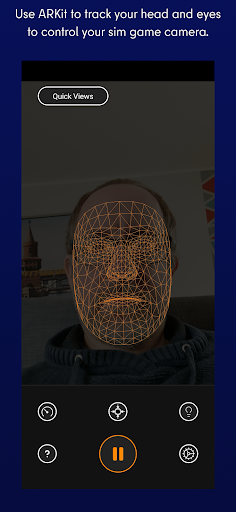
SmoothTrack is an innovative tool that transforms your mobile device into a 3D head tracking controller for simulation games. By leveraging the AR capabilities of your device, it allows you to intuitively control in-game camera perspectives with natural head movements.

The app supports any game compatible with TrackIR, including popular titles like Microsoft Flight Simulator, Elite: Dangerous, and Euro Truck Simulator 2. Its unique feature set includes adjustable movement sensitivity, dark mode for battery savings, and compatibility with FreeTrack/TrackIR protocols.

Whether you're a flight simulation enthusiast or a gamer looking for more immersive experiences, SmoothTrack offers a near-magical way to enhance gameplay through subtle head gestures without requiring additional equipment.

Features

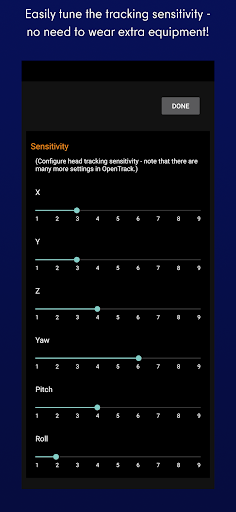
SmoothTrack stands out with its advanced AR-based head tracking technology that enables precise camera control in supported games. The app's key innovation lies in its ability to magnify slight head movements, allowing users to achieve dramatic perspective shifts with minimal physical motion.

Additional features include two display modes - a battery-saving dark mode for OLED screens and a bright mode for low-light environments. The app also provides comprehensive gesture controls that work seamlessly with your device's front-facing camera.

What makes SmoothTrack particularly valuable is its broad compatibility with various simulation games and its user-friendly setup process. The app's support system, including Discord and email assistance, ensures users can maximize their experience with the tool.

Core function accuracy & effectiveness

Head tracking technology represents a significant advancement in how users interact with simulation games by providing an intuitive method to control the in-game camera. SmoothTrack leverages augmented reality capabilities to deliver precise 3D head tracking, ensuring that even the slightest movement of the user's head is accurately translated into the virtual environment. This level of precision allows gamers to seamlessly adjust their viewpoint simply by moving their head, offering an immersive experience that traditional input devices cannot match. The app supports any game compatible with TrackIR, making it versatile for various simulation titles. By magnifying the movements within the game, users can achieve a wide field of view with minimal physical effort, enhancing both realism and accessibility. For instance, leaning forward provides a closer inspection of a flight simulator cockpit, while tilting your head upwards reveals overhead panels in an aircraft. Such functionality not only enriches gameplay but also aids situational awareness during complex maneuvers. Moreover, SmoothTrack eliminates the need for additional hardware such as headsets or specialized controllers, relying solely on the deviceu2019s camera to interpret facial gestures. This approach democratizes access to advanced gaming controls, allowing more players to enjoy sophisticated simulations without investing in costly peripherals. Overall, SmoothTrack exemplifies core function accuracy and effectiveness through its innovative use of AR technology, delivering a near-magical interaction between real-world movements and digital responses.

Interface simplicity & intuitiveness

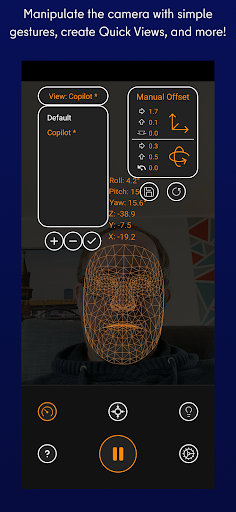
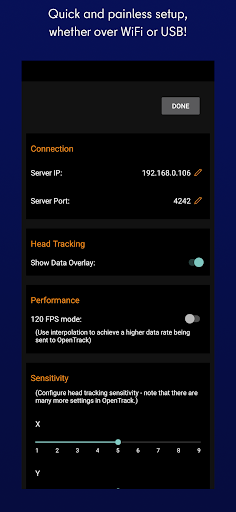
A crucial aspect of any tool application is its interface design, which should prioritize ease of use and quick comprehension. SmoothTrack excels in this area by offering a straightforward setup process that requires no additional equipment beyond the user's existing device capable of installing Google AR services. Once configured, the app utilizes simple camera gestures to interpret head movements, enabling users to manipulate their in-game perspective effortlessly. This minimalist approach ensures that even those unfamiliar with head tracking technology can quickly adapt to using SmoothTrack effectively. Furthermore, the inclusion of features like dark mode demonstrates attention to detail regarding user comfort and device longevity, particularly beneficial for OLED screens where battery consumption and screen burn-in are concerns. Bright mode caters to different environmental conditions, ensuring optimal visibility whether playing in well-lit spaces or dimly lit rooms. Compatibility extends across numerous popular simulation games supporting FreeTrack or TrackIR protocols, including Microsoft Flight Simulator, Elite: Dangerous, and Euro Truck Simulator 2 among others. Each integration maintains the same level of simplicity and intuitiveness, reinforcing the notion that powerful tools do not necessitate complicated interfaces. Additionally, ongoing support via Discord and email channels underscores the developeru2019s commitment to maintaining an accessible product. Users encountering issues or seeking new functionalities have direct lines of communication to receive assistance promptly. Thus, SmoothTrack combines robust technical performance with an emphasis on user-friendly design principles, resulting in an interface that is both simple and highly effective at facilitating engaging gaming experiences.

Props

Intuitive head tracking

Broad game compatibility

No extra hardware needed

Adjustable sensitivity

Efficient power usage

Cons

Requires AR services

Limited to supported games

Device positioning crucial

May need calibration

Depends on lighting conditions

Features and Functions

What is this app and what can I use it for?

A 3D head tracking tool for controlling sim game cameras using AR

How do I download and install this app on my device?

Search SmoothTrack in Google Play, tap Install, and open after download

How do I get started after opening the app for the first time?

Grant camera permissions and follow the on-screen setup instructions

What are the main features and capabilities of this app?

Head tracking for games, adjustable sensitivity, dark mode feature

How can I customize my experience and adjust preferences?

Adjust tracking sensitivity and switch between dark/bright modes

How do I save or bookmark my favorite content for later access?

Not applicable as the app doesn't have bookmarking features

How can I share content with friends or on social media?

Share app via Play Store or send link through messaging apps

How do I access detailed information and explore more content?

Visit official website or check detailed guide in-app resources

What permissions does this app need and how do I manage them?

Needs camera access for head tracking functionality only

How do I check for updates and keep the app running smoothly?

Enable automatic updates in Google Play Store settings
Show more

User Reveiws

{{ comment.reviewer_name }}
{{ comment.review_date_formatted}}
{{ comment.review_content }}
{{ tab.name }}
{{ comment.reviewer_name }}
{{ comment.review_date_formatted}}
{{ comment.review_content }}
No reviews with this rating