


YouTube

3.90

Information

Category:

Video Players & Editors

Price:

Free

Rank:

8

Rating:

3.90

Overview

YouTube is the world's leading video-sharing platform, offering a diverse range of content from music videos to educational tutorials. The app provides users with personalized recommendations and access to live streams, trending topics, and creator communities.

With its robust mobile application, YouTube allows seamless video consumption across devices. Users can subscribe to channels, engage with creators through comments, and even create their own content directly from smartphones. Its integration with YouTube Music and availability of YouTube Premium make it a comprehensive entertainment solution.

The platform's value extends beyond casual viewing - it serves as a powerful tool for learning, marketing, and content creation. Whether you're looking to stay updated on global trends or seeking specific instructional content, YouTube delivers a customizable and engaging experience tailored to individual preferences.

Features

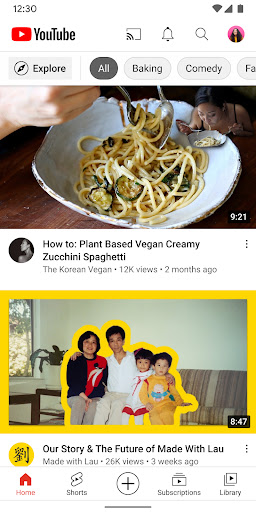
YouTube offers an extensive array of features that enhance user engagement and content discovery. The Home tab provides AI-driven personal recommendations while the Subscriptions section keeps users updated with their favorite channels.

The app excels in content creation tools, allowing users to upload videos, go live, and interact with audiences in real-time. Advanced features include Stories, Premieres, and Community Posts that strengthen creator-viewer relationships. The platform also supports channel memberships and Super Chats, enabling direct fan support.

For premium users, features like background play, offline downloads, and ad-free viewing significantly improve the experience. The integration with YouTube Music and availability of parental controls demonstrate the platform's commitment to serving diverse user needs while maintaining content accessibility.

Video format compatibility

Video format compatibility refers to an application's ability to support and play various video file types and codecs ensuring users can access content in different formats without issues The YouTube app excels in this area by supporting a wide range of video formats and resolutions from standard definition to 4K and beyond This extensive compatibility ensures that whether you're watching a music video a live stream or an educational tutorial the content will play smoothly on your device The app automatically adjusts the video quality based on your internet connection providing an optimal viewing experience regardless of your network speed Furthermore YouTube supports advanced features like HDR and 360-degree videos allowing creators to deliver immersive experiences to their audience This versatility in format support enables users to enjoy diverse content types from basic vlogs to professional-grade productions all within a single platform The app also allows content creators to upload videos in various formats directly from their mobile devices maintaining the original quality of the footage This comprehensive format compatibility combined with YouTube's adaptive streaming technology ensures that viewers can enjoy high-quality uninterrupted playback across different devices and network conditions making it a reliable choice for video consumption

AI-powered editing features

AI-powered editing features represent the integration of artificial intelligence technologies into video editing tools enabling users to enhance their content with minimal effort YouTube incorporates several AI-driven functionalities that assist both amateur and professional creators in producing high-quality videos One prominent feature is the automated captions generation which uses speech recognition algorithms to create accurate subtitles for videos This not only improves accessibility for hearing-impaired viewers but also enhances SEO performance making videos more discoverable The platform also employs AI for content moderation automatically detecting and flagging inappropriate material ensuring a safer viewing environment for users Additionally YouTube's AI analyzes video content to provide personalized recommendations helping viewers discover relevant content while assisting creators in reaching their target audience The app offers AI-based video enhancement tools that automatically adjust lighting color balance and stabilize shaky footage resulting in professional-looking videos without requiring advanced editing skills These intelligent features extend to copyright management where the system can identify and manage copyrighted material within uploaded videos offering solutions like automatic Content ID matching For content creators these AI-powered capabilities significantly streamline the video production process allowing them to focus more on creative aspects rather than technical details The combination of these intelligent editing features makes YouTube a powerful tool for video creation and distribution catering to both casual users and professional media producers

Props

User-friendly interface

Extensive content library

Powerful recommendation engine

Cross-device compatibility

Robust creator tools

Cons

Ad-supported free version

Limited offline functionality

Regional content restrictions

High data consumption

Variable content quality

Features and Functions

What is this app and what can I use it for?

YouTube is a video-sharing platform for watching, creating, and sharing diverse content

How do I download and install this app on my device?

Download YouTube from Google Play Store or Apple App Store on your device

How do I get started after opening the app for the first time?

Sign in, set preferences, and explore recommended content on home screen

What are the main features and capabilities of this app?

Offers video streaming, creation tools, live streaming, and community features

How can I customize my experience and adjust preferences?

Adjust notification settings and content preferences in Settings menu

How do I save or bookmark my favorite content for later access?

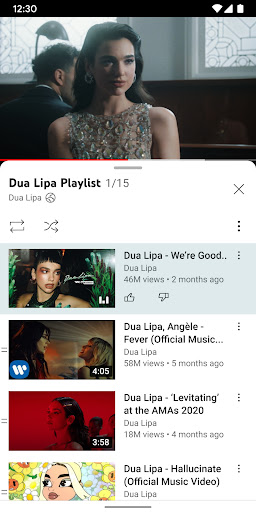
Save videos by adding to playlist or downloading with Premium subscription

How can I share content with friends or on social media?

Share content via social media links or direct messaging options

How do I access detailed information and explore more content?

Explore detailed information through video descriptions and related content

What permissions does this app need and how do I manage them?

Requires storage and microphone permissions for optimal functionality

How do I check for updates and keep the app running smoothly?

Enable automatic updates in app store settings for latest version
Show more

User Reveiws

{{ comment.reviewer_name }}
{{ comment.review_date_formatted}}
{{ comment.review_content }}
{{ tab.name }}
{{ comment.reviewer_name }}
{{ comment.review_date_formatted}}
{{ comment.review_content }}
No reviews with this rating