SWF Player Pro

2.50

Information

Category:

Video Players & Editors

Price:

$ 0.99

Rank:

32

Rating:

2.50

Overview

SWF Player Pro is a specialized video player designed for SWF format files, offering users the ability to play Flash content on Android devices. The app supports two rendering engines - Android AIR and Ruffle - ensuring broad compatibility with various SWF files.

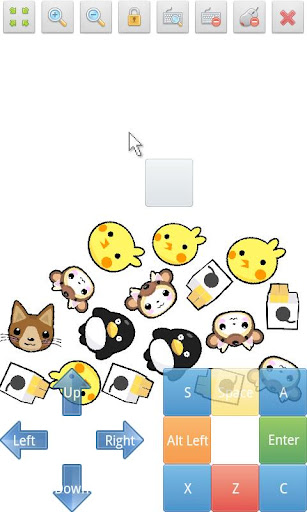
Key features include zoom functionality, play/stop controls, fullscreen mode, and multi-touch virtual keypad support. Additionally, it provides advanced settings for display options like wmode, background color, and rotation. This makes it an essential tool for users who need to view legacy Flash content on modern devices.

Features

The app's standout feature is its dual-engine support for playing SWF files, utilizing both Android AIR and Ruffle technologies. This ensures maximum compatibility with different versions of Flash content.

Users can benefit from practical tools including zoom controls, virtual mouse functionality, and customizable display settings. The advanced settings menu allows detailed adjustments for wmode, background color, wake-lock, rotation, quality, and scale parameters.

Additional features include file browser integration, making it easy to locate and open SWF files from your device storage. The combination of these features creates a comprehensive solution for viewing and managing Flash content on Android devices.

Video format compatibility

Video format compatibility is a crucial feature for any video player application as it determines the range of file types that can be played within the app. For SWF Player Pro this aspect is particularly important because it specializes in playing SWF format files which are commonly associated with Adobe Flash content. The application supports SWF files through two distinct engines Android AIR and Ruffle providing users with flexibility and reliability when accessing their Flash content. This dual-engine support ensures that regardless of the SWF file version or complexity users can enjoy a seamless playback experience. Additionally the app goes beyond just basic playback by offering advanced settings such as wmode background color wake-lock rotation quality and scale options. These features allow users to customize their viewing experience according to their preferences and device capabilities. By supporting a specific yet widely-used format like SWF SWF Player Pro caters to a niche market of users who still rely on Flash content for various purposes including entertainment education and business presentations. The ability to handle multi-touch virtual keypads virtual mouse controls and file browsing further enhances its versatility making it an essential tool for anyone needing to play SWF files on their Android device.

AI-powered editing features

While SWF Player Pro primarily focuses on video playback rather than editing it does incorporate certain features that leverage advanced technology to enhance user experience. Although it may not include traditional AI-powered editing tools like those found in dedicated video editors the application provides several functionalities that contribute to an optimized viewing experience. For instance the app supports zoom in and out capabilities allowing users to magnify specific areas of the SWF content for better visibility or comprehension. This feature is particularly useful when viewing detailed animations or interactive elements within Flash applications. Furthermore SWF Player Pro offers play and stop controls enabling users to manage their content consumption effectively. The inclusion of fullscreen mode enhances immersion especially when engaging with visually rich SWF files. Multi-touch virtual keypad support and virtual mouse functionality provide intuitive interaction methods mimicking desktop-like control over SWF content directly on mobile devices. Advanced settings such as wake-lock rotation and scaling options demonstrate how the application utilizes intelligent algorithms to adapt playback parameters based on user behavior and device orientation. While these features might not constitute conventional AI-driven editing capabilities they represent smart design choices aimed at improving usability and accessibility. By focusing on these aspects SWF Player Pro delivers a refined viewing experience tailored specifically for SWF format enthusiasts ensuring that even without complex editing tools users can enjoy comprehensive control over their Flash content playback.

Props

Supports multiple SWF engines

Advanced customization options

Comprehensive playback controls

Multi-touch functionality

Virtual mouse support

Cons

Limited to SWF format

No native iOS support

Premium version required

Complex for beginners

Occasional compatibility issues

Features and Functions

What is this app and what can I use it for?

A professional SWF player for Android devices supporting Flash content playback

How do I download and install this app on my device?

Search for SWF Player Pro in Google Play Store and install via the official listing

How do I get started after opening the app for the first time?

Launch the app, grant necessary permissions, and use the file browser to select SWF files

What are the main features and capabilities of this app?

Dual-engine support, advanced settings, zoom controls, and virtual mouse functionality

How can I customize my experience and adjust preferences?

Adjust settings through the advanced options menu including display and playback preferences

How do I save or bookmark my favorite content for later access?

Use the built-in file browser to locate and save favorite SWF files for quick access

How can I share content with friends or on social media?

Share SWF file locations via Android's share function or export links through supported apps

How do I access detailed information and explore more content?

Access detailed information through the app's settings and help documentation sections

What permissions does this app need and how do I manage them?

Requires storage and file access permissions to read and play SWF content from device

How do I check for updates and keep the app running smoothly?

Enable automatic updates in Google Play Store or manually check for app updates regularly
Show more

User Reveiws

{{ comment.reviewer_name }}
{{ comment.review_date_formatted}}
{{ comment.review_content }}
{{ tab.name }}
{{ comment.reviewer_name }}
{{ comment.review_date_formatted}}
{{ comment.review_content }}
No reviews with this rating