AI Video Generator-HiCut

3.70

Information

Category:

Art & Design

Price:

Free

Rank:

51

Rating:

3.70

Overview

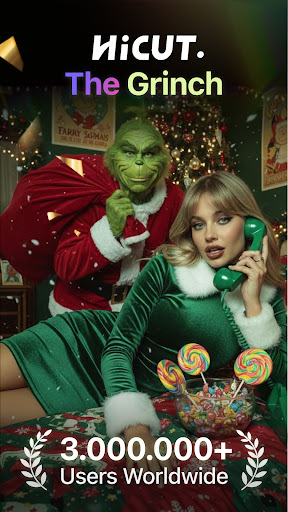
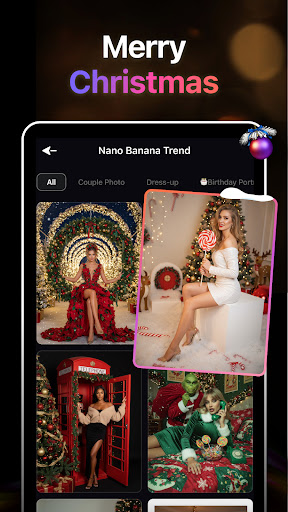
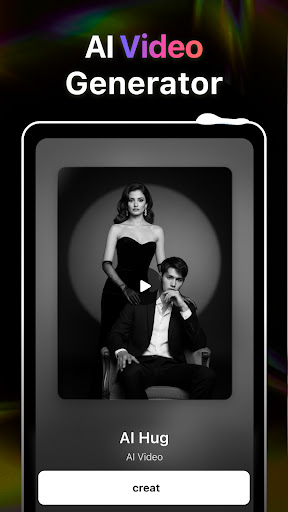
HiCut is an innovative AI-powered photo editing and video creation app designed for creative enthusiasts. The application specializes in transforming ordinary photos into stunning anime, comic, or game-inspired visuals while offering unique features like AI Hugging Video technology. This feature allows users to create realistic virtual hugs by uploading two single-person photos, transcending the boundaries of time and space. With advanced AI filters and tools, HiCut caters to those looking to explore artistic styles, from anime transformations to retro game characters.

The app also provides a variety of creative tools such as Cartoon Filters, Anime Photo Editors, and Game Character Makers, enabling users to design personalized avatars and memorable content. Whether you're an artist seeking inspiration or someone wanting to create unique memories with loved ones, HiCut offers cutting-edge solutions to unleash your creativity.

Features

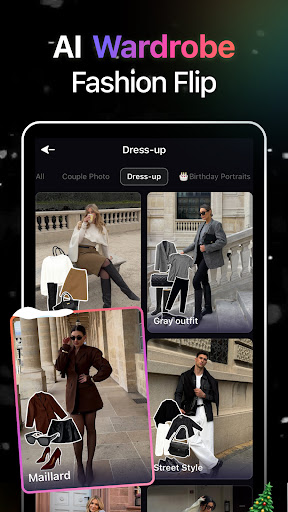
HiCut stands out with its diverse range of AI-driven features tailored for art and design enthusiasts. One of its most notable innovations is the AI Hugging Video function, which uses advanced algorithms to generate lifelike virtual hugs from uploaded photos. This feature is particularly valuable for creating emotional connections with people who may no longer be present. Additionally, the Anime Photo Editor lets users convert their images into hundreds of customizable anime styles, catering to fans of Japanese animation.

For those interested in gaming aesthetics, HiCut includes a Game Character Maker that generates unique avatars inspired by retro, cyberpunk, and pixel art themes. The Cartoon Filters further enhance creativity by turning photos into vibrant comic book-style visuals. These features collectively empower users to experiment with various artistic mediums, making HiCut a versatile tool for both casual creators and professional designers.

Creative tool completeness

In the realm of digital creativity, having access to comprehensive tools is paramount for users seeking to express their artistic visions. HiCut stands out in this regard by offering an extensive suite of creative instruments that cater to a wide array of artistic needs. The application's AI Hugging Video feature allows users to create emotionally resonant content by generating virtual hugs from uploaded photos, thus transcending traditional boundaries of digital interaction. Additionally, the Anime Photo Editor provides hundreds of style options to transform ordinary images into captivating anime representations, while Cartoon Filters and Avatars enable the conversion of personal photos into comic book-style illustrations or personalized avatars. For those interested in gaming aesthetics, the Game Character Maker offers diverse filters that simulate various game art styles, including retro, cyberpunk, and pixel art. These robust functionalities empower users to explore different artistic expressions, from creating anime characters to designing unique avatars and game personas. By integrating these advanced AI-driven features, HiCut not only facilitates creative exploration but also ensures that users can achieve professional-grade results without requiring specialized skills or equipment. This democratization of creative tools makes sophisticated artistic expression accessible to everyone, enhancing both personal projects and professional endeavors.

Canvas/format flexibility

The ability to work with diverse canvas sizes and formats is essential for artists and designers who wish to adapt their creations for various platforms and mediums. HiCut addresses this need by providing unparalleled flexibility in its canvas and format options. Users can manipulate their artwork across multiple dimensions, ensuring compatibility with both digital and print requirements. Whether one is designing for social media profiles, creating content for video platforms, or preparing materials for professional printing, HiCut's adaptable framework supports these varied outputs seamlessly. The application's AI-powered tools maintain image quality and stylistic integrity regardless of the chosen format, allowing creators to switch between different project specifications without losing artistic nuances. Furthermore, HiCut's support for specialized formats such as animated GIFs and video files extends its utility beyond static image editing, enabling dynamic content creation. This versatility is particularly valuable for professionals in fields like marketing and entertainment, where content must often be repurposed across different channels. By offering such comprehensive format flexibility, HiCut empowers users to focus on their creative vision without being constrained by technical limitations. The application's intelligent scaling algorithms and format conversion capabilities ensure that final outputs meet industry standards while preserving the original artistic intent. This combination of flexible canvas options and reliable format support makes HiCut an indispensable tool for modern digital artists and designers seeking to maximize their creative potential across diverse platforms.

Props

User-friendly interface

Innovative AI features

Versatile style options

Emotionally engaging tools

High-quality output

Cons

Limited free features

Subscription costs

Occasional bugs

Learning curve

Internet required

Features and Functions

What is this app and what can I use it for?

HiCut is an AI app for creating anime videos and editing photos with unique styles.

How do I download and install this app on my device?

Download HiCut from Google Play Store and install it on your Android device.

How do I get started after opening the app for the first time?

Follow the on-screen tutorial to explore tools and settings after launching HiCut.

What are the main features and capabilities of this app?

Main features include AI Hugging Video, Anime Photo Editor, and Game Character Maker.

How can I customize my experience and adjust preferences?

Adjust preferences in settings to customize styles, filters, and other options.

How do I save or bookmark my favorite content for later access?

Save edited content locally or bookmark templates within the app for future use.

How can I share content with friends or on social media?

Share creations directly via social media platforms integrated into HiCut.

How do I access detailed information and explore more content?

Access detailed guides in Help Center or explore advanced features in menus.

What permissions does this app need and how do I manage them?

The app requires camera and storage permissions managed in device settings.

How do I check for updates and keep the app running smoothly?

Enable automatic updates in Google Play Store to keep HiCut running smoothly.
Show more

User Reveiws

{{ comment.reviewer_name }}
{{ comment.review_date_formatted}}
{{ comment.review_content }}
{{ tab.name }}
{{ comment.reviewer_name }}
{{ comment.review_date_formatted}}
{{ comment.review_content }}
No reviews with this rating