Move to iOS

3.70

Information

Category:

Tools

Price:

Free

Rank:

1

Rating:

3.70

Overview

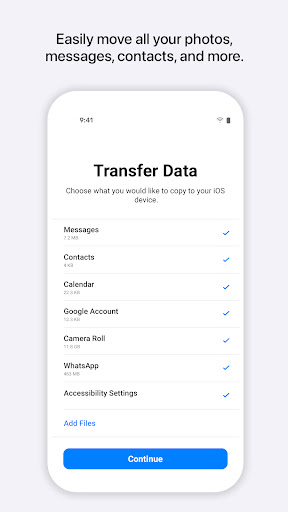
Move to iOS is a powerful migration tool designed to simplify the transition from Android to iPhone or iPad. This application enables users to transfer various types of content seamlessly and securely, including contacts, message history, photos, videos, mail accounts, calendars, and even WhatsApp data.

The app creates a private Wi-Fi network between devices, ensuring a direct and secure connection without the need for third-party storage solutions. With an intuitive interface and straightforward process, Move to iOS makes switching platforms easier than ever before, allowing users to quickly start enjoying their new Apple device.

Features

Move to iOS offers several notable features that enhance the migration experience. The app automatically detects nearby Android devices and establishes a secure peer-to-peer connection through a dedicated Wi-Fi network. Users can transfer a wide range of content categories, including apps, camera media, call logs, and voice memos.

Advanced permission management allows users to control which data types are shared during migration. While basic functionality requires location access for establishing connections, optional permissions enable transferring SMS messages, multimedia files, contact lists, and calendar events. This flexible approach ensures users maintain control over their personal information while benefiting from comprehensive data migration capabilities.

Core function accuracy & effectiveness

The Move to iOS app is designed to provide an accurate and effective solution for users transitioning from Android devices to iOS. This core functionality is crucial as it addresses the common challenges associated with switching operating systems, ensuring a seamless migration experience. The app achieves this by automatically and securely transferring a wide array of content data including contacts, message history, camera photos and videos, mail accounts, calendars, call logs, voice memos, and even WhatsApp content. By creating a private Wi-Fi network between the Android device and the new iPhone or iPad, the app facilitates a direct and secure transfer process. Users simply need to enter a security code to initiate the migration, which places their content in the appropriate locations on their new device. This level of accuracy and effectiveness in transferring data not only saves time but also provides peace of mind, knowing that personal information is handled securely. The importance of this functionality cannot be overstated as it removes the hassle typically associated with manually backing up and restoring data when switching platforms. For many users, this feature alone can be the deciding factor in choosing to switch to iOS, making the Move to iOS app an invaluable tool in simplifying what is often perceived as a complex process.

Interface simplicity & intuitiveness

Move to iOS excels in providing an interface that is both simple and intuitive, making the transition from Android to iOS as user-friendly as possible. The importance of an intuitive interface lies in its ability to minimize the learning curve and reduce user frustration during what can be a stressful switch between operating systems. Upon launching the app, users are greeted with clear instructions that guide them through each step of the migration process. The design emphasizes minimalistic visuals and straightforward navigation, ensuring that users can focus on the task at hand without being overwhelmed by unnecessary complexities. Key actions such as establishing a Wi-Fi connection, entering the security code, and initiating the data transfer are presented in a logical sequence, with each step building naturally upon the previous one. Optional permissions for additional data types like SMS, photos, contacts, and music are requested in a non-intrusive manner, allowing users to maintain control over their personal information. This approach not only enhances the overall user experience but also reinforces trust in the app's ability to handle sensitive data responsibly. The simplicity of the interface extends to post-migration, where users find their content organized and ready for immediate use on their new device. By prioritizing clarity and ease of use, Move to iOS ensures that even those who may be less tech-savvy can complete the transition with confidence, ultimately enhancing satisfaction with their new iOS device.

Props

Seamless data transfer

User-friendly interface

Secure Wi-Fi connection

Comprehensive content coverage

Optional permission control

Cons

Limited to Apple devices

Requires stable connection

Android version needed

Time-consuming process

Specific compatibility needs

Features and Functions

What is this app and what can I use it for?

A migration tool for moving Android content to iOS devices

How do I download and install this app on my device?

Search 'Move to iOS' on Google Play Store and install it

How do I get started after opening the app for the first time?

Open app, accept terms, and follow on-screen instructions

What are the main features and capabilities of this app?

Transfers contacts, messages, media, and app data securely

How can I customize my experience and adjust preferences?

Adjust app permissions in device settings menu

How do I save or bookmark my favorite content for later access?

Not applicable as app doesn't store transferred data

How can I share content with friends or on social media?

Share migration status via Android notifications

How do I access detailed information and explore more content?

View detailed transfer progress within app interface

What permissions does this app need and how do I manage them?

Requires location, optional permissions for specific data

How do I check for updates and keep the app running smoothly?

Check Google Play Store for app updates regularly
Show more

User Reveiws

{{ comment.reviewer_name }}
{{ comment.review_date_formatted}}
{{ comment.review_content }}
{{ tab.name }}
{{ comment.reviewer_name }}
{{ comment.review_date_formatted}}
{{ comment.review_content }}
No reviews with this rating

















