




Microsoft Copilot is an advanced AI-powered productivity application designed to assist users in accomplishing a wide range of tasks through smart chat and voice interactions. The app integrates GPT-5, the latest in AI model technology, offering both reasoning and conversational capabilities in one seamless experience. Whether you need help with writing, research, or even generating images from text prompts, Copilot serves as your personal AI assistant.
One of the key features of Microsoft Copilot is its ability to provide instant summaries, rewrites, translations, and proofreading across hundreds of languages. It also supports creative processes such as composing stories, drafting emails, and designing visuals. With functionalities ranging from simplifying grocery lists to aiding in complex business projects, this app is suitable for anyone looking to enhance their daily productivity and creativity.
The true value of Microsoft Copilot lies in its versatility and intuitive design. By combining powerful AI technologies with user-friendly interfaces, it ensures that users can easily access sophisticated tools without needing technical expertise. This makes it an invaluable resource for professionals, students, and creatives alike who are seeking efficient ways to manage their work and bring ideas to life.
Microsoft Copilot stands out due to its comprehensive set of features tailored to boost productivity and creativity. At its core, the app provides an AI chat assistant capable of engaging in meaningful conversations, answering complex questions, and delivering concise summaries. Users can interact via text or voice, making it accessible and convenient for various preferences.
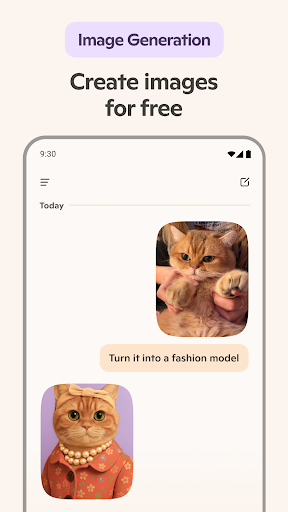
Beyond basic chat functionalities, Copilot includes specialized tools like an AI photo generator that turns textual descriptions into high-quality visuals. This feature supports diverse applications, from creating illustrations for children's books to visualizing film storyboards. Additionally, the app offers robust language support, translating and proofreading content in hundreds of languages, including regional dialects.
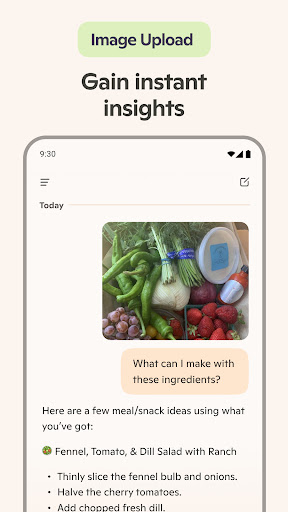
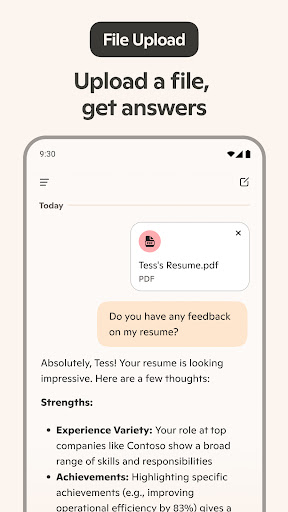
Another significant aspect is its utility in professional settings. Copilot assists in drafting emails, cover letters, resumes, and more, ensuring polished and effective communication. Its ability to simplify everyday tasks, such as preparing shopping lists or meal prep plans, further enhances its appeal. Overall, these features collectively empower users to achieve more with less effort, leveraging cutting-edge AI technology.
Advanced AI models
Versatile productivity tools
Multilingual support
User-friendly interface
Creative assistance features
Requires internet connection
Premium features may cost extra
Learning curve for new users
Limited offline functionality
Dependent on third-party integrations

Client for Nextcloud Deck
 4.60
4.60
Take control of your clipboard with Clipper!
3.90
Professional calendar app for Google Calendar, MS Outlook & Exchange
4.20
Automates browsing any website and notifies you of important changes or events
4.30
The ultimate file manager for rooted devices. The original and still the best.
4.00
Intelligent AI Assistant
4.10
Lightweight PDF, Word, Excel reader.
4.60
Set up, print, and get support—in one place
4.20
QuickEdit is a fast, stable and full featured text and code editor.
4.20
Stay on top of your to-dos with Google Tasks, part of Google Workspace.
4.60
Secure, fast, open-source, Remote Desktop Client for Windows and Linux with SSH
4.60
Docker, Kubernetes management over Portainer Mobile
4.40
A Pixel Art watchface inspired by other iconic 90s designs for Wear OS devices!
4.40
Secure your apps with lock screens, use custom themes and different features.
4.40
Experience real multitasking on your Android!
4.00
⏰ Finally a timer app which can run multiple timers simultaneously on your watch
3.90
A Revolutionary All-in-One Artificial Intelligence Tools
3.80
Ads Free App! Editor, Hide File, Copy, Move, Delete and Rename.. all facility av
1.70
Create study competitions, track your hours, and stay consistent with friends
4.1


User Reveiws