
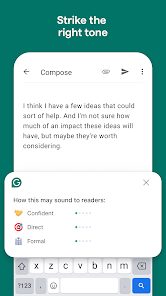
Grammarly is a productivity app designed to enhance your writing skills. It functions as an advanced writing assistant that checks for grammatical errors, spelling mistakes, and punctuation issues. The app also provides style suggestions to improve clarity and readability in various types of documents. Whether you're crafting emails, essays, or social media posts, Grammarly ensures your writing is polished and professional.
This app stands out with its AI-powered algorithms that adapt to your writing style over time. It offers real-time feedback across different platforms including web browsers and mobile devices. With Grammarly, users can write with confidence knowing their content is error-free and well-structured, making it an essential tool for students, professionals, and anyone looking to improve their written communication.
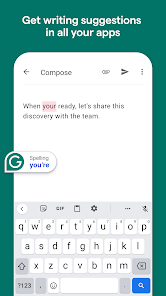
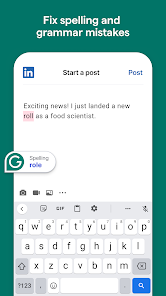
Grammarly boasts an array of features that cater to improving writing efficiency. Its core functionality includes grammar and spell checking, which operates seamlessly across different applications. Additionally, the app provides vocabulary enhancement suggestions, helping users expand their lexicon and avoid repetitive language.
Another notable feature is the tone detector, which helps users maintain an appropriate tone for their audience. Grammarly also integrates plagiarism detection tools, ensuring originality in academic and professional settings. These comprehensive features make Grammarly a versatile writing companion suitable for diverse writing needs, from casual texting to formal document preparation.
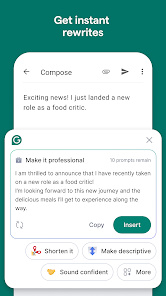
Task management is a cornerstone of productivity applications, and Grammarly excels in this area by offering users an efficient way to handle writing tasks. The app provides real-time suggestions for grammar, punctuation, and style improvements, which helps users focus on their core writing responsibilities without getting bogged down by technical details.
Grammarly's implementation includes an intuitive interface that highlights errors and offers one-click solutions, streamlining the editing process. This feature ensures that users can manage their writing tasks effectively, whether they are crafting emails, reports, or creative content.
The value to users is significant as it not only saves time but also enhances the quality of their written communication. By delegating the task of proofreading to Grammarly, users can concentrate on the substance of their content, knowing that the app will help maintain high standards of writing.
Cross-device synchronization is vital for users who work across multiple devices and need consistent access to their data. Grammarly ensures reliable synchronization, allowing users to seamlessly transition between their desktop, tablet, and smartphone while maintaining access to their personalized settings, saved corrections, and writing history.
The application achieves this through cloud-based storage, where user preferences and document edits are securely saved and instantly updated across all linked devices. This means that no matter where a user logs in, their Grammarly experience remains uniform and up-to-date.
This reliability translates into enhanced productivity for users, as they can pick up exactly where they left off, with all their Grammarly-enhanced documents and settings intact. It provides peace of mind, knowing that their work is safely stored and readily available whenever and wherever needed.
Accurate grammar checks
User-friendly interface
Real-time corrections
Wide platform support
Customizable feedback
Premium version costly
Occasional incorrect suggestions
Limited offline functionality
Privacy concerns with data
Heavy on system resources

Android Wallet Password Manager
 4.80
4.80
Send files, sync SMS, notifications & clipboard across devices via local network
4.40
Automates browsing any website and notifies you of important changes or events
4.30
Smart PDF reader & editor to view, organize and manage PDF documents easily.
3.70
PDF scanner & converter for files, photos, lottery, QR codes. One swipe away!
4.50
A Pixel Art watchface inspired by other iconic 90s designs for Wear OS devices!
4.40
Intelligent AI Assistant
4.10
Lightweight PDF, Word, Excel reader.
4.60
Scan paperwork into PDF/JPG, generate your own e-signature and send fax or email
4.70
The long-awaited modern gallery app for your Nextcloud server
4.70
A beautiful digital clock with autostart and many other functions
4.70
Quickly and easily keep track of your work shifts
4.70
When you Focus, so will your Bean in this cozy focus timer
4.30
Professional calendar app for Google Calendar, MS Outlook & Exchange
4.20
Make apps & sites with natural language prompts
4.10
Activate Two Factor Authentication (2FA or Multi OTP), Password manager and more
4.10
Access your phone's notifications, calls, apps, photos & texts on your PC
3.90
Remotely view listen control and record cameras.
3.70
IP Camera Viewer - Android TV : RTSP Surveillance camera viewer for Android TV
4.2


User Reveiws