
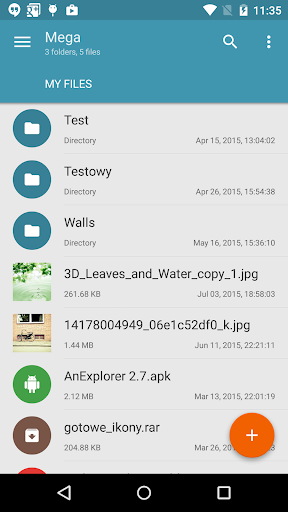
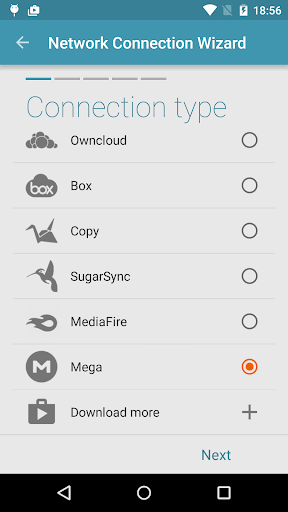
Mega Plugin for Solid Explorer is a productivity-enhancing application designed specifically to integrate Mega cloud storage with the Solid Explorer file manager. This plugin enables users to seamlessly connect their Mega accounts, providing full management capabilities for cloud-stored files directly from Solid Explorer.
With this app, you can copy, move, rename, view, download, and upload files effortlessly. It also supports streaming music and videos, making it an all-in-one solution for managing your digital content on the go. Whether you're organizing documents or accessing media files, this plugin ensures that your data is always within reach.
The true value of Mega Plugin lies in its ability to streamline workflows by consolidating access to cloud resources. Users who frequently interact with cloud storage will find this tool indispensable for maintaining efficient file management practices across multiple platforms.
This plugin stands out due to its comprehensive feature set tailored for efficient file handling. One of its key features is the ability to perform a wide array of file operations such as copying, moving, renaming, viewing, downloading, and uploading files directly through the Solid Explorer interface.
Additionally, the plugin supports multimedia streaming, allowing users to play music and videos without needing to download them first. This feature enhances user experience by providing instant access to media content stored in the cloud.
Setting up the connection is straightforward: simply tap the + button, choose 'Cloud connection', select the Mega option, enter your login credentials, and tap connect. Once connected, you can easily navigate and manage your cloud drive, ensuring that your files are organized and accessible whenever needed.
Seamless integration
Comprehensive file management
Multimedia streaming support
User-friendly setup process
Efficient workflow enhancement
Limited to Solid Explorer users
Requires separate Mega account
No standalone functionality
Potential security concerns
Dependent on third-party services

A Revolutionary All-in-One Artificial Intelligence Tools
 3.80
3.80
QuickBooks Workforce lets teams view pay info and track time in one place.
4.70
Experience Reading - Night Mode for Documents
4.40
A lightweight JSON & XML files creator, editor and viewer (Premium Version)
4.40
IP Camera Viewer - Android TV : RTSP Surveillance camera viewer for Android TV
4.3
Find and delete junk files & block unwanted notifications & manage files
3.70
Tally and goal counter for Wear OS & mobile
4.50
The ultimate file manager for rooted devices. The original and still the best.
4.00
QuickEdit is a fast, stable and full featured text and code editor.
4.20
Scientific calculator for Android - looks and operates like the real thing!
4.90
PDF scanner & converter for files, photos, lottery, QR codes. One swipe away!
4.50
CalenGoo is a very flexible and feature-rich calendar app
4.40
Docker, Kubernetes management over Portainer Mobile
4.40
Access, manage and transfer files on Android, PC, Mac, NAS and cloud storages.
4.30
A customizable calendar for your Wear OS watch
4.20
Todo reminder
4.10
Experience real multitasking on your Android!
4.00
Easiest event planning, volunteer signups & parent teacher conference scheduling
2.20
AI Video AI Image Private LLM AI Browser Llama Gemma Ollama Connect LLM Studio
4.3


User Reveiws