VScode for Android

3.10

Information

Category:

Productivity

Price:

$ 11.99

Rank:

38

Rating:

3.10

Overview

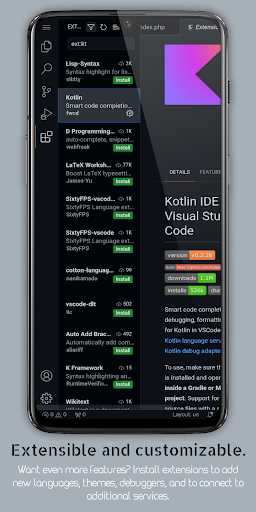
VScode for Android brings the powerful functionality of Visual Studio Code to mobile devices, allowing developers to write, edit, and debug code on-the-go. With support for a wide range of programming languages and file types, this app is designed to provide flexibility and efficiency in coding tasks.

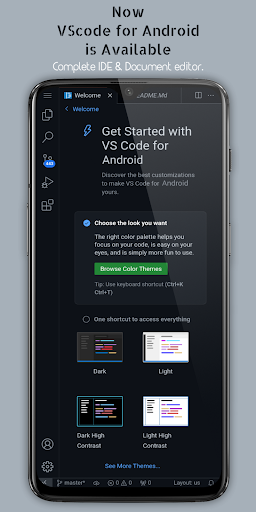
The app features customizable themes, extensions, IntelliSense, debugging tools, and built-in Git support, making it easier than ever to code professionally from your mobile device. Its immersive display experience with fullscreen mode ensures an uninterrupted coding session, while remote access capabilities allow users to connect via a web browser using their phone's IP address and port 8080.

Whether you're working on HTML, Python, Java, or other languages, VScode for Android supports your coding needs and optimizes productivity through innovative features like multi-cursor editing, split view, and integrated terminal access.

Features

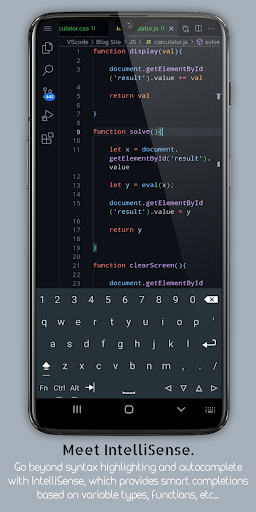
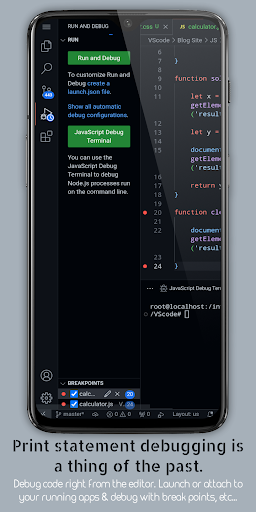
VScode for Android offers a comprehensive set of features that enhance the coding experience on mobile devices. The app includes support for debugging, syntax highlighting, intelligent code completion through IntelliSense, snippets, and code refactoring operations such as renaming variables or extracting methods.

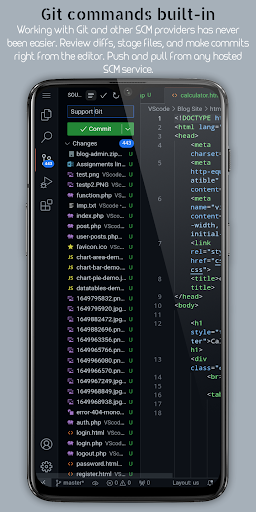
Embedded Git allows users to perform version control operations directly within the editor, while customizable keyboard shortcuts let you tailor key bindings to your preferences. Additionally, the app provides an immersive display experience with fullscreen mode, remote access via web browsers, multi-cursor editing capabilities, a built-in terminal for command-line access, split view editing for multitasking, and an integrated task runner for automating common tasks.

Language-specific settings enable customization on a per-language basis, optimizing workflow efficiency. Workspace management features help organize and switch between different projects seamlessly, ensuring maximum productivity for developers on the go.

Core task management

Task management in a productivity application refers to the app's ability to help users organize, prioritize, and complete tasks efficiently. For VScode for Android, core task management is deeply integrated into its functionality, allowing developers to not only write code but also manage their coding projects effectively. The app supports a wide range of programming languages and file types, which means that users can switch between different projects and tasks without losing context or efficiency. One of the key features contributing to task management is the built-in terminal, which allows users to execute commands directly within the app, streamlining workflows and eliminating the need to switch between different applications. Additionally, the split view editing feature enables multitasking by allowing users to work on multiple files simultaneously, thus enhancing productivity. Another important aspect is the integrated task runner, which automates repetitive tasks, saving time and reducing errors. IntelliSense further aids in task completion by offering intelligent code completion, which helps users write code faster and with fewer mistakes. Moreover, the app's support for Git and other version control systems facilitates collaboration and task tracking across teams. Users can perform common version control operations directly from the editor, ensuring that everyone is on the same page. With customizable keyboard shortcuts, users can tailor their experience to suit their workflow preferences, making task execution more intuitive and efficient. Overall, VScode for Android provides a comprehensive suite of tools that empower users to manage their coding tasks with precision and ease.

Cross-device synchronization reliability

Cross-device synchronization reliability is crucial for users who need consistent access to their data and projects across multiple devices. In the case of VScode for Android, this feature ensures that developers can seamlessly transition between their desktop and mobile environments without any loss of data or functionality. The app achieves this through several mechanisms designed to maintain data integrity and availability. First, it offers remote access capabilities, allowing users to connect to their mobile device's VScode instance via a web browser using the phone's IP address and port 8080. This means that regardless of location, users can continue working on their projects as long as they have internet access. Furthermore, the app supports cloud-based storage solutions, enabling automatic backups and synchronization of files across devices. This ensures that the latest versions of files are always available, reducing the risk of data loss due to device failure or misplacement. Workspace management is another critical component of cross-device synchronization. VScode for Android allows users to organize and switch between different projects and workspaces effortlessly, maintaining the state of each workspace so that users can pick up where they left off on any device. Customizable settings on a per-language basis also contribute to synchronization reliability, as users can ensure that their preferred configurations are applied consistently across devices. By providing these robust synchronization features, VScode for Android enhances user productivity and peace of mind, knowing that their work is securely stored and readily accessible wherever they go.

Props

Powerful coding tool

Wide language support

Efficient debugging

Customizable interface

Remote accessibility

Cons

Complex for beginners

Limited mobile functionality

Requires internet

Occasional bugs

Not officially by Microsoft

Features and Functions

What is this app and what can I use it for?

A mobile code editor supporting multiple languages and debugging tools

How do I download and install this app on my device?

Visit Google Play Store, search for the app, and install it on your device

How do I get started after opening the app for the first time?

Open the app, explore the interface, and start a new project or load existing files

What are the main features and capabilities of this app?

Debugging, syntax highlighting, IntelliSense, Git integration, and more

How can I customize my experience and adjust preferences?

Adjust themes, keyboard shortcuts, and language-specific settings in preferences

How do I save or bookmark my favorite content for later access?

Use bookmarks or save files locally within the app's workspace

How can I share content with friends or on social media?

Share code snippets via email or copy-paste into social media platforms

How do I access detailed information and explore more content?

Access detailed guides through in-app documentation or online resources

What permissions does this app need and how do I manage them?

The app needs storage permissions; manage them in device settings

How do I check for updates and keep the app running smoothly?

Check Google Play Store for updates and ensure auto-update is enabled
Show more

User Reveiws

{{ comment.reviewer_name }}
{{ comment.review_date_formatted}}
{{ comment.review_content }}
{{ tab.name }}
{{ comment.reviewer_name }}
{{ comment.review_date_formatted}}
{{ comment.review_content }}
No reviews with this rating












